
- 58 Posts
- 61 Comments

 41·2 months ago
Currently I’m using ungoogled-chromium on Linux just for PWA because of this decision made by Mozilla 😔
For What application you face issue? I’m curious as XWayland should provide backward compatibility.
Used Mainline to install it on Ubuntu 23.10. Together with Nvidia driver v550, it is working without an issue for me.
Wait, I thought they are recipient of Sovereign Tech Fund. Didn’t that help them with their budget?



Your CSS knowledge is still useful to customise other areas of Firefox UI.

Initially I followed this route to avoid Snap version provided by Ubuntu.
Later I just downloaded Tar package from Mozilla, and update it manually.
In short, I just abandoned deb/snap/flatpak altogether.
UX is a very subjective matter.
Bad news is that it is not clear at this point whether Mozilla is going to go forward with the implementation. A post on Reddit by one of the project members suggests that the build is a “rough proof-of-concept”. Some features tested in the build “did not survive”. It is unclear which did not, as they are not mentioned. Mozilla is, however, implementing those that survived the cut into Firefox. Again, the poster does not mention which those are. It is also not verified that the poster is actually a member of the project team, so take this with a grain of salt as well.



For Ubuntu, I use https://ubuntu.com/security/oval


Installed OpenWRT on my NetGear router like 2 years back, and it didn’t give me any trouble since then. BTW, the amount of configuration options it offer is mindbogglingly.


Ubuntu > Fedora > Ubuntu > Arch > Ubuntu
Ah! I was not aware of the fact that Alias service can encrypt email before forwarding to actual mailbox.

Email alias indeed helps to avoid spam and helps you to assume separate identity per site, but won’t help in any way to stop mail provider/server from processing your email data for user profiling / targeted ad purpose.
Buying email domain and self-hosting is only the full proof way from privacy POV, but it is really difficult target to accomplish. A privacy respecting email hosting + alias should be next ideal choice, IMO.
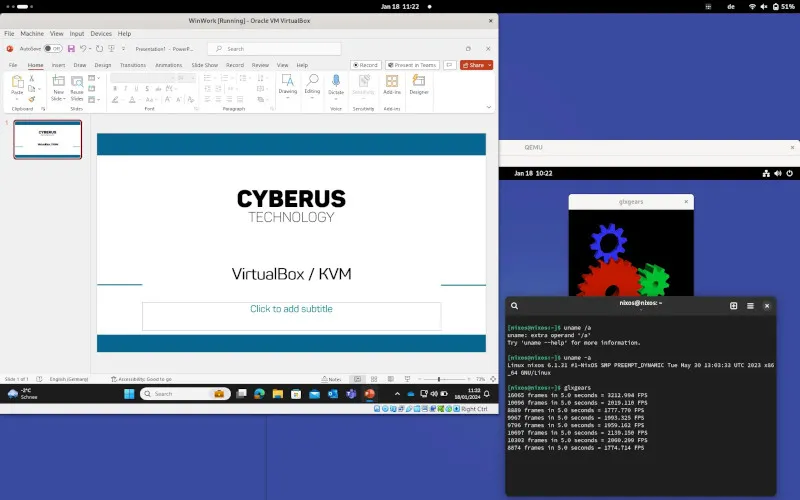
Known issues and limitations
Currently, Intel x86_64 is the only supported host platform.
    AMD will most likely work too but is considered experimental at the moment.
Linux is required as a host operating system for building and running VirtualBox KVM.
Starting with Intel Tiger Lake (11th Gen Core processors) or newer, split lock detection must be turned off in the host system. This can be achieved using the Linux kernel command line parameter split_lock_detect=off or using the split_lock_mitigate sysctl.
Source: https://github.com/cyberus-technology/virtualbox-kvm
Docker can be run in rootless mode[1]. Ideally that should be the standard mode unless you have specific requirements not satisfied by rootless mode.

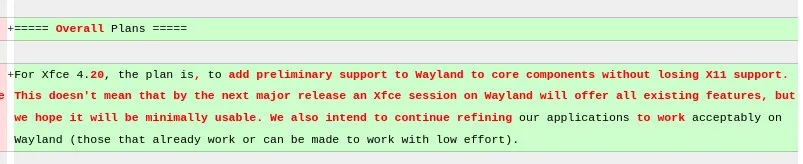
https://wiki.xfce.org/releng/wayland_roadmap